

強化学習の本に掲載されているサンプルコードを動かしてみるとDQNのコードの実行に2hr17minも要してしまう。Macbook ProのGPUを活用して実行の短縮を計ることを試みてみた。
tensorflow-metalインストールに失敗
tensorflow-metalをpipでインストールしようとしてもpythonのversionが新しすぎて失敗する。
$python --version
Python 3.13.2
$mkdir foo;cd foo
$python -m venv .
$source bin/activate
(foo)$pip install tensorflow-metal
ERROR: Could not find a version that satisfies the requirement tensorflow-metal (from versions: none)
uvを使ってみる
venvとは別のPackage管理ツールuvを使ってみる。こいつはPackageだけでなくPythonのVersionも管理できる。uv officialからinstall.shを入手してgeminiに読んでもらった。するとscriptのusageにインストール先が記載されている。zprofileやzshrcを書き換えて、恒久的なPATH変更は行わずsource ~/.local/bin/envすればuvバイナリにPATHが通る。
$sh install.sh
$source ~/.local/bin/env
$uv python install 3.10
$mkdir metal; cd metal
$uv init .
$uv add tensorflow-metal
$uv add tensorflow==2.19
$uv run python
>>> import tensorflow as tf
>>> tf.config.list_physical_devices('GPU') # device_type文字列を与えると配列が返る
[PhysicalDevice(name='/physical_device:GPU:0', device_type='GPU')]
>>> tf.config.list_physical_devices('TPU')
[]
Python 3.9以降でないとtensorflow-metalはインストール出来ない。tensorflowは最新版2.21ではNGだったので2.19をチョイス。
インストールには成功している様だ。
Tensorflow Plugin - Metal - Apple Developer
astral-sh/uv: An extremely fast Python package and project manager, written in Rust.
uv とは何か?その設計思想と再現性ある環境構築のためのガイド #Rust - Qiita
Install Python with UV · Mac Install Guide · 2026
使ってみる
次のコード(memory usage 7.2GB, CPU Time 30min)でGPUが使われるのかを検証してみる
import tensorflow as tf

cifar = tf.keras.datasets.cifar100
(x_train, y_train), (x_test, y_test) = cifar.load_data()
model = tf.keras.applications.ResNet50(
    include_top=True,
    weights=None,
    input_shape=(32, 32, 3),
    classes=100,)

loss_fn = tf.keras.losses.SparseCategoricalCrossentropy(from_logits=False)
model.compile(optimizer="adam", loss=loss_fn, metrics=["accuracy"])
model.fit(x_train, y_train, epochs=5, batch_size=64)
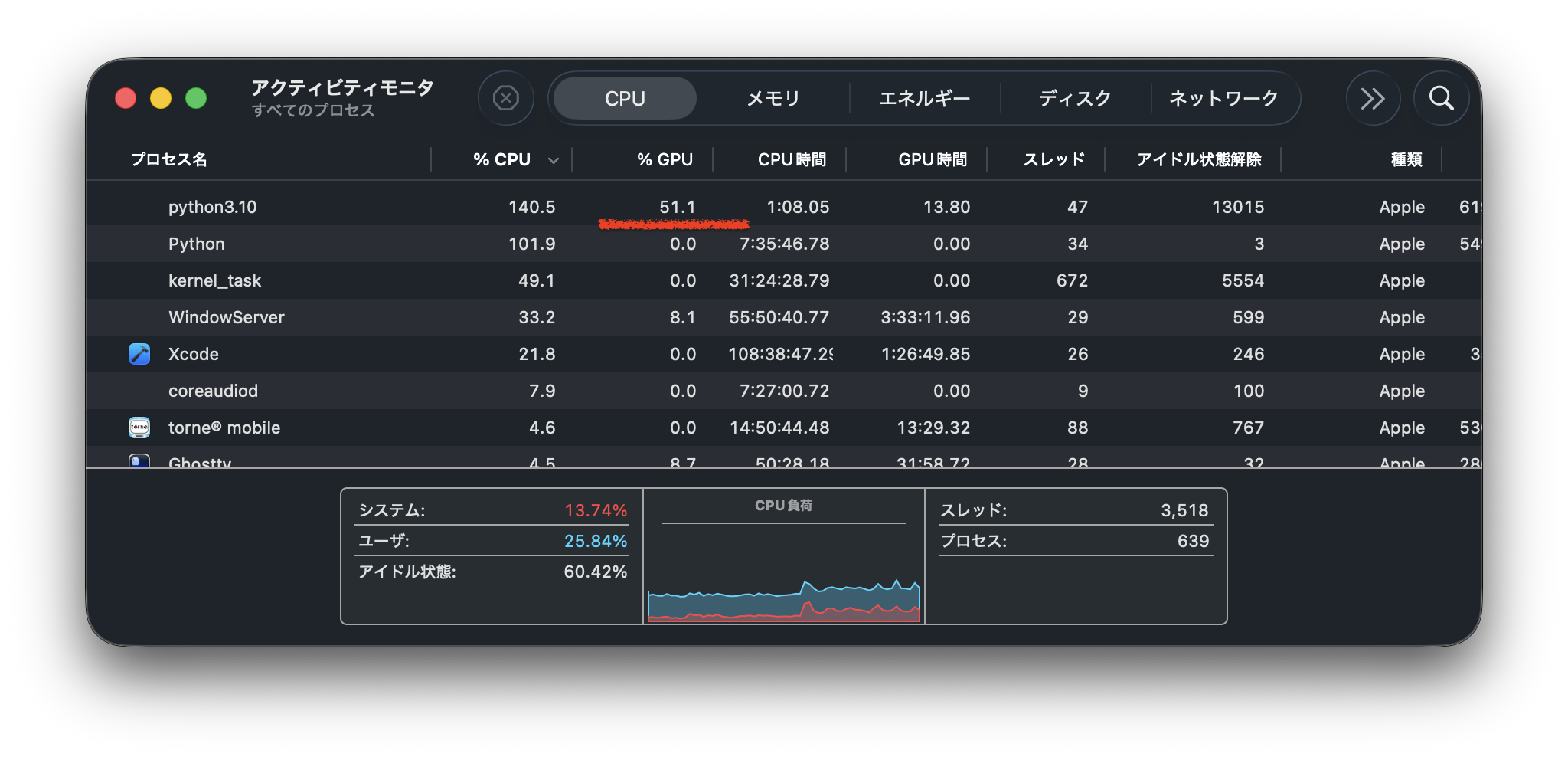
アクティビティ・モニタからはGPUが使用されていることが見て取れる
$uv run python chk_metal.py
2026-03-09 21:01:43.181899: I metal_plugin/src/device/metal_device.cc:1154] Metal device set to: Apple M1 Pro
2026-03-09 21:01:43.182098: I metal_plugin/src/device/metal_device.cc:296] systemMemory: 16.00 GB
2026-03-09 21:01:43.182106: I metal_plugin/src/device/metal_device.cc:313] maxCacheSize: 5.92 GB
WARNING: All log messages before absl::InitializeLog() is called are written to STDERR
I0000 00:00:1773057703.182527 79553837 pluggable_device_factory.cc:305] Could not identify NUMA node of platform GPU ID 0, defaulting to 0. Your kernel may not have been built with NUMA support.
I0000 00:00:1773057703.182920 79553837 pluggable_device_factory.cc:271] Created TensorFlow device (/job:localhost/replica:0/task:0/device:GPU:0 with 0 MB memory) -> physical PluggableDevice (device: 0, name: METAL, pci bus id: <undefined>)
Epoch 1/5
2026-03-09 21:01:49.654876: I tensorflow/core/grappler/optimizers/custom_graph_optimizer_registry.cc:117] Plugin optimizer for device_type GPU is enabled.
782/782 ━━━━━━━━━━━━━━━━━━━━ 380s 439ms/step - accuracy: 0.0773 - loss: 4.7684
(to be ommited)
上記コードをepoch=2としてGPU使用の効果を確認してみる
無し: uv run python resNet50.py 2153.51s user 233.24s system 352% cpu 11:17.82 total
有り: uv run python resNet50.py 599.40s user 271.22s system 147% cpu 9:50.82 total
実行時間は87%にしかならん。GPU(M1 Pro)の能力が低いからか?
$sw_vers
ProductName:            macOS
ProductVersion:         26.2
BuildVersion:           25C56
GPUの使用のOn/Off
ソースコードの改変が必要だ。環境変数による制御は効かない。
export TF_DISABLE_METAL=1          # 最近のtensorflow-metalで有効な場合あり
# またはもっと強力に
export CUDA_VISIBLE_DEVICES=""     # Metalでも一部効くケースがある(互換性のため)
python your_script.py
次のコードの断片ではGPU Offとはならない
import tensorflow as tf
tf.debugging.set_log_device_placement(True)
# Create some tensors
with tf.device('/CPU:0'):
  a = tf.constant([[1.0, 2.0, 3.0], [4.0, 5.0, 6.0]])
  b = tf.constant([[1.0, 2.0], [3.0, 4.0], [5.0, 6.0]])

c = tf.matmul(a, b)
print(c)
2026-03-09 13:14:44.256613: I tensorflow/core/common_runtime/eager/execute.cc:1754] Executing op MatMul in device /job:localhost/replica:0/task:0/device:GPU:0
tf.Tensor(
[[22. 28.]
 [49. 64.]], shape=(2, 2), dtype=float32)
次のコードはGPU Offとなる例である(courtesy of Grok)
Module: tf.config TensorFlow v2.16.1
import tensorflow as tf

# これを最初(他のtf操作より前)に実行
tf.config.set_visible_devices([], 'GPU')

# 確認用(GPUが消えているはず)
print(tf.config.list_physical_devices())          # GPUが[]になる
print(tf.config.list_physical_devices('GPU'))     # []

tf.debugging.set_log_device_placement(True)

# 以降のコード
a = tf.constant([[1.0, 2.0, 3.0], [4.0, 5.0, 6.0]])
b = tf.constant([[1.0, 2.0], [3.0, 4.0], [5.0, 6.0]])

c = tf.matmul(a, b)
print(c)
2026-03-09 13:33:55.970195: I tensorflow/core/common_runtime/eager/execute.cc:1754] Executing op MatMul in device /job:localhost/replica:0/task:0/device:CPU:0
tf.Tensor(
[[22. 28.]
 [49. 64.]], shape=(2, 2), dtype=float32)
GPUを活用したPythonコード
Apple M4 MacでTensorFlowが爆速!GPU有効化etcで機械学習が10倍速くなる方法を解説 #AI - Qiita